使用spring-boot-admin对springboot1.x版本的项目进行监听

项目中SpringBoot的版本为1.5.10.RELEASE,spring-boot-admin的版本为1.5.7,如果是其他版本的springboot请自行对照maven项目版本进行配置spring-boot-admin

Server配置

需要的依赖

1
2
3
4
5
6
7
8
<dependency>
<groupId>org.springframework.boot</groupId>
<artifactId>spring-boot-starter-web</artifactId>
</dependency>
<dependency>
<groupId>de.codecentric</groupId>
<artifactId>spring-boot-admin-starter-server</artifactId>
</dependency>

通过<dependencyManagement>标签引用 spring-boot-admin 的父级依赖,然后在<dependencies>标签中可以不需要添加版本号方便版本号统一管理,也可不用dependencyManagement自己直接指定版本号

1
2
3
4
5
6
7
8
9
10
11
<dependencyManagement>
<dependencies>
<dependency>
<groupId>de.codecentric</groupId>
<artifactId>spring-boot-admin-dependencies</artifactId>
<version>${spring-boot-admin.version}</version>
<type>pom</type>
<scope>import</scope>
</dependency>
</dependencies>
</dependencyManagement>

引入依赖后修改项目启动的端口号(也可不修改,默认8080),打开application.yml文件

1
2
server:
port: 8081

配置后,启动访问 http://localhost:8081 如下图,暂时没有client项目启动所以列表为空:
在这里插入图片描述

Client配置

需要的依赖(依赖的版本号同Server一样),因为spring-boot-admin-starter-client中已经包含了spring-boot-starter-actuator包所以这里没有引入

1
2
3
4
5
6
7
8
<dependency>
<groupId>org.springframework.boot</groupId>
<artifactId>spring-boot-starter-web</artifactId>
</dependency>
<dependency>
<groupId>de.codecentric</groupId>
<artifactId>spring-boot-admin-starter-client</artifactId>
</dependency>

<dependencyManagement>标签

1
2
3
4
5
6
7
8
9
10
11
<dependencyManagement>
<dependencies>
<dependency>
<groupId>de.codecentric</groupId>
<artifactId>spring-boot-admin-dependencies</artifactId>
<version>${spring-boot-admin.version}</version>
<type>pom</type>
<scope>import</scope>
</dependency>
</dependencies>
</dependencyManagement>

打开application.yml文件,添加配置

1
2
3
4
5
6
7
8
9
10
11
12
13
14
15
16
17
management:
# 指定客户端监听接口的路径
context-path: /client_jar
security:
# 关闭自带的安全拦截
enabled: false
spring:
application:
# 指定项目名
name: client-jar
boot:
admin:
# 指定服务端项目地址(为上边server项目配置的端口号)
url: http://localhost:8081
server:
# 指定项目端口号
port: 8082

如果项目是配置成WAR包启动的话,yml中需要添加spring.boot.admin.client.service-base-url=项目访问地址,如果不添加的话项目监控无法识别项目访问地址,会抛异常信息如下,已经很明确的指出如果是部署到Server容器启动需要指定service-base-url填入项目访问路径

1
2
3
4
5
6
7
8
9
10
11
12
13
14
15
16
17
18
2019-05-18 14:36:34.124 [registrationTask1] ERROR org.springframework.scheduling.support.TaskUtils$LoggingErrorHandler:95 - Unexpected error occurred in scheduled task.
java.lang.IllegalStateException: service-base-url must be set when deployed to servlet-container
at de.codecentric.boot.admin.client.registration.DefaultApplicationFactory.getServiceUrl(DefaultApplicationFactory.java:68)
at de.codecentric.boot.admin.client.registration.DefaultApplicationFactory.getManagementUrl(DefaultApplicationFactory.java:95)
at de.codecentric.boot.admin.client.registration.DefaultApplicationFactory.getHealthUrl(DefaultApplicationFactory.java:115)
at de.codecentric.boot.admin.client.registration.DefaultApplicationFactory.createApplication(DefaultApplicationFactory.java:50)
at de.codecentric.boot.admin.client.registration.ApplicationRegistrator.createApplication(ApplicationRegistrator.java:140)
at de.codecentric.boot.admin.client.registration.ApplicationRegistrator.register(ApplicationRegistrator.java:65)
at de.codecentric.boot.admin.client.registration.RegistrationApplicationListener$1.run(RegistrationApplicationListener.java:80)
at org.springframework.scheduling.support.DelegatingErrorHandlingRunnable.run(DelegatingErrorHandlingRunnable.java:54)
at java.util.concurrent.Executors$RunnableAdapter.call(Executors.java:511)
at java.util.concurrent.FutureTask.runAndReset$$$capture(FutureTask.java:308)
at java.util.concurrent.FutureTask.runAndReset(FutureTask.java)
at java.util.concurrent.ScheduledThreadPoolExecutor$ScheduledFutureTask.access$301(ScheduledThreadPoolExecutor.java:180)
at java.util.concurrent.ScheduledThreadPoolExecutor$ScheduledFutureTask.run(ScheduledThreadPoolExecutor.java:294)
at java.util.concurrent.ThreadPoolExecutor.runWorker(ThreadPoolExecutor.java:1142)
at java.util.concurrent.ThreadPoolExecutor$Worker.run(ThreadPoolExecutor.java:617)
at java.lang.Thread.run(Thread.java:745)

然后启动项目,查看Server端页面,在列表中展示了我们已经启动的client项目,Status为UP代表项目正常运行
在这里插入图片描述
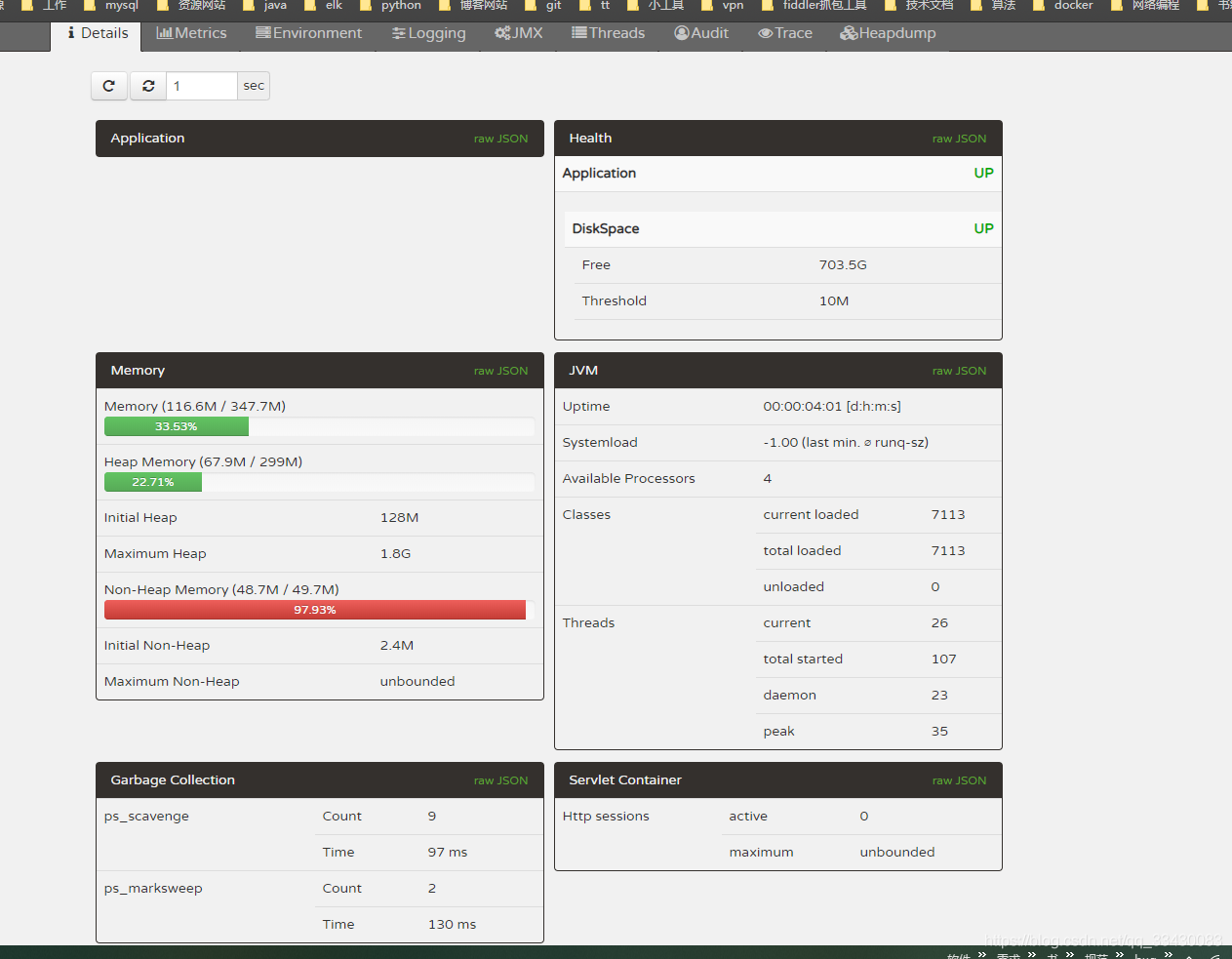
点击details按钮进入详情页查看项目信息
在这里插入图片描述

添加安全验证

给server端添加

  • 需要添加的的依赖

    1
    2
    3
    4
    5
    6
    7
    8
    9
    10
    <!-- 继承自spring-boot-admin-dependencies,给server添加登录页面 -->
    <dependency>
    <groupId>de.codecentric</groupId>
    <artifactId>spring-boot-admin-server-ui-login</artifactId>
    </dependency>
    <!-- 引入springboot权限配置 -->
    <dependency>
    <groupId>org.springframework.boot</groupId>
    <artifactId>spring-boot-starter-security</artifactId>
    </dependency>
    • application.yml文件添加security.user.namesecurity.user.password配置,指定账号密码
      1
      2
      3
      4
      security:
      user:
      name: admin
      password: 123456
  • 服务端完整配置如下

    1
    2
    3
    4
    5
    6
    server:
    port: 8081
    security:
    user:
    name: admin
    password: 123456
  • 添加Security的权限拦截,参考自spring-boot-admin官方文档 http://codecentric.github.io/spring-boot-admin/1.5.7/#_securing_spring_boot_admin_server

    1
    2
    3
    4
    5
    6
    7
    8
    9
    10
    11
    12
    13
    14
    15
    16
    17
    18
    19
    20
    21
    22
    23
    24
    25
    26
    27
    28
    29
    30
    31
    32
    33
    34
    package com.lx.config;

    import org.springframework.context.annotation.Configuration;
    import org.springframework.security.config.annotation.web.builders.HttpSecurity;
    import org.springframework.security.config.annotation.web.configuration.WebSecurityConfigurerAdapter;

    /**
    * 权限拦截配置
    *
    * @author 段誉
    * @create 2019-05-17 13:04
    */
    @Configuration
    public class SecurityConfig extends WebSecurityConfigurerAdapter {
    @Override
    protected void configure(HttpSecurity http) throws Exception {
    // Page with login form is served as /login.html and does a POST on /login
    http.formLogin().loginPage("/login.html").loginProcessingUrl("/login").permitAll();
    // The UI does a POST on /logout on logout
    http.logout().logoutUrl("/logout");
    // The ui currently doesn't support csrf
    http.csrf().disable();

    // Requests for the login page and the static assets are allowed
    http.authorizeRequests()
    .antMatchers("/login.html", "/**/*.css", "/img/**", "/third-party/**")
    .permitAll();
    // ... and any other request needs to be authorized
    http.authorizeRequests().antMatchers("/**").authenticated();

    // Enable so that the clients can authenticate via HTTP basic for registering
    http.httpBasic();
    }
    }

    配置过后启动项目,如下图,输入之前配置的账号密码admin123456即可登录成功
    在这里插入图片描述
    在这里插入图片描述

  • 服务端配置过账号密码后客户端也需要添加配置,打开client的application.yml文件添加spring.boot.admin.usernamespring.boot.admin.password设置要和server中设置的一致

    1
    2
    3
    4
    5
    6
    7
    8
    9
    spring:
    application:
    name: client-jar
    boot:
    admin:
    url: http://localhost:8081
    # 指定连接服务端的账号密码
    username: admin
    password: 123456
  • 客户端完整配置如下

    1
    2
    3
    4
    5
    6
    7
    8
    9
    10
    11
    12
    13
    14
    management:
    context-path: /client_jar
    security:
    enabled: true
    spring:
    application:
    name: client-jar
    boot:
    admin:
    url: http://localhost:8081
    username: admin
    password: 123456
    server:
    port: 8082

    然后再启动项目client项目就可以在server中看到了
    在这里插入图片描述

给client端添加

需要添加的依赖

1
2
3
4
<dependency>
<groupId>org.springframework.boot</groupId>
<artifactId>spring-boot-starter-security</artifactId>
</dependency>

打开application.yml文件,将management.security.enabled设置为true,表示开启安全验证,添加security.user.usernamesecurity.user.passwordsecurity.basic.path配置

1
2
3
4
5
6
7
8
9
10
11
12
management:
security:
enabled: true

security:
user:
# 设置访问客户端接口的账号密码
name: client
password: 123456
basic:
# 指定security拦截的路径 /client_jar/**:只拦截项目监控的相关接口
path: /client_jar/**

重启项目,访问项目监听接口中的任意代码,发现会弹出登录弹窗,例如访问/loggers接口
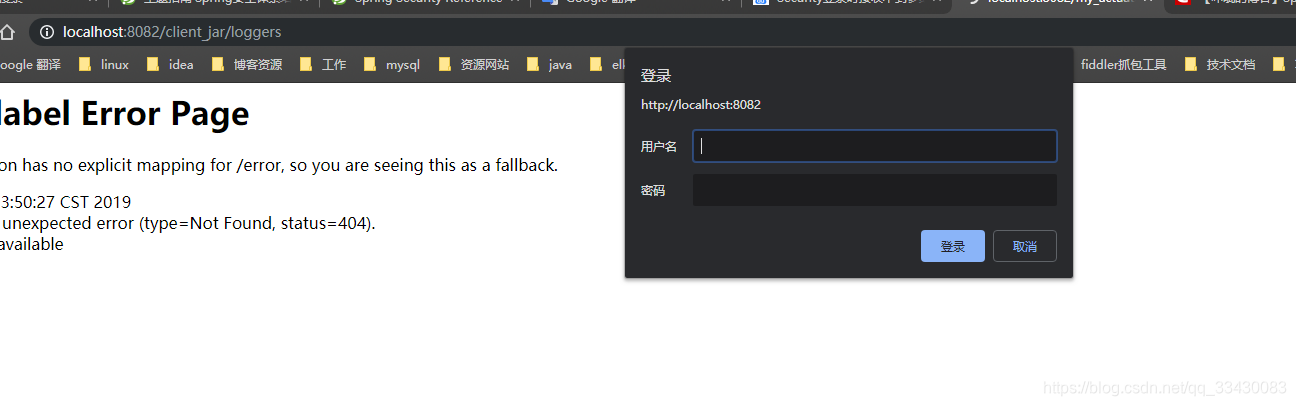
在这里插入图片描述
输入配置的账号密码后即可正常返回数据
在这里插入图片描述
这个时候访问服务端监听页面发现client-jar客户端连接不上在这里插入图片描述
是因为客户端也设置了账号密码但是在连接到服务端时没有传入账号密码导致的需要添加spring.boot.admin.client.metadata.user.namespring.boot.admin.client.metadata.user.password传入设置的账号密码就可以了

1
2
3
4
5
6
7
8
spring:
boot:
admin:
client:
# metadata传递的参数为map类,所以user.name和user.password不是user对象下的属性而是map的key值
metadata:
user.name: client
user.password: 123456

完整配置信息如下

1
2
3
4
5
6
7
8
9
10
11
12
13
14
15
16
17
18
19
20
21
22
23
24
25
management:
context-path: /client_jar
security:
enabled: true
spring:
application:
name: client-jar
boot:
admin:
url: http://localhost:8081
username: admin
password: 123456
client:
metadata:
user.name: client
user.password: 123456
server:
port: 8082

security:
user:
name: client
password: 123456
basic:
path: /client_jar/**

再重新client端,然后登陆server端页面,可以正常监听client端
在这里插入图片描述

Demo地址

https://gitee.com/fengzxia/springboot-admin-and-actuator-learn

作者: 只是学习学习
邮箱: fengzxia1000@163.com
原文地址: https://fengzxia.gitee.io/posts/3a8da9de.html
版权声明: 商业转载请联系作者获得授权,非商业转载请注明出处。